On this page

📢 Update (November 2026): Cloudflare now recommends Vinext on Cloudflare Workers for full-stack Next.js applications. This replaces the OpenNext recommendation I added to this post in December 2025. If you’re starting a Next.js project on Cloudflare today, start with Vinext.
Vinext is Cloudflare’s open-source implementation of the Next.js API on Vite. It supports both the App Router and Pages Router, including server-side rendering, React Server Components, Server Actions, API routes, and ISR. Cloudflare released Vinext 1.0 on September 28, 2026.
Before migrating an existing app, run npx vinext check and review the compatibility dashboard. The migration guide explains how npx vinext init adds Vinext alongside your existing Next.js setup so you can compare the two before switching production traffic.
There are still differences to check. Vinext targets the stable Next.js 16 APIs, but Cache Components and Partial Prerendering remain incomplete. Webpack-specific plugins need Vite equivalents, and build-time image and font optimization do not reproduce the full Next.js pipeline. See the differences from Next.js, and follow the Workers deployment guide to configure caching and image optimization for your app.
Already using OpenNext? Cloudflare still documents maintaining existing OpenNext applications and recommends migrating when compatibility allows. If your Next.js site is a static export, Cloudflare Pages remains an option.
The original April 2024 test is preserved below. It covers Next.js 13.4.16 with the old @cloudflare/next-on-pages deployment path. These results are not a test of Vinext or current Next.js support on Workers.
As a developer, I am always looking for ways to test the limits of different hosting providers and see how well they support different frameworks and technologies. I recently tested Cloudflare Pages with my Next.js app, and the results differed from what I expected. In this article, I’ll walk you through my experience and the changes I had to make to get my app to work on Cloudflare Pages.
Next.js Host Check App
Before I dive into my experience with Cloudflare Pages, let me give you some background on my app. I have built an app that tests 13 of the most essential features of Next.js Pages Architecture. These features include server-side rendering, image optimization, and API routes, among others. I’ve put Cloudflare Pages to the test. I’m deploying this application on different hosting providers to see how well they support Next.js and what features they do and don’t support.
My app is a Next.js Pages Architecture application built with version 13.4.16. I attempted to deploy it out of the box to different hosting providers. However, I ran into some difficulties with Cloudflare Pages.
My Experience with Next.js on Cloudflare Pages
The biggest thing I came across was the edge runtime requirement. All server-side routes in your Next.js project must be configured as edge runtime routes. When running on Cloudflare Pages, you must add export const runtime=edge to each server route.
This means you are limited to the edge runtime for Incremental Static Regeneration (ISR), getServerSideProps(), API Routes, and everything else server-side.
So I added the line export const runtime=edge to every file, but the build still failed. Instead, I had to use export const runtime=experimental-edge, which got my Next.js app to at least build in Cloudflare Pages.
But that was not the end of my problems. I had to add a nodejs_compat flag within Cloudflare Pages. I’m not sure why, but I did.
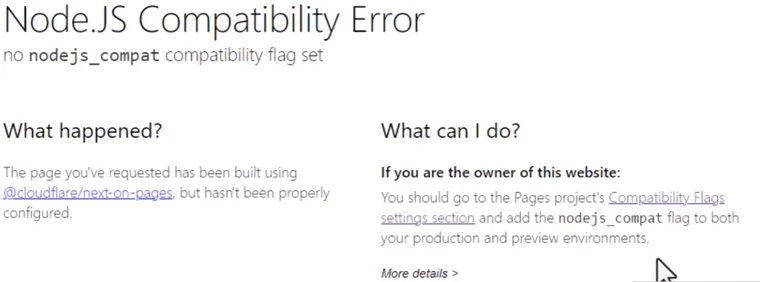
After one more final rebuild, my app was built and deployed correctly. I could access my application live and deploy it to the web. Finally, it was time to test what features of Next.js worked.
Next.js Feature Support in Cloudflare Pages (2024 Test)
With the host-check-nextjs app deployed to Cloudflare Pages, I could now run the automated Cypress tests against the deployed app. Here are the results of the automated testing. These are the worst results so far in my testing of Next.js hosting providers.
| Next.js Feature | Support |
|---|---|
| Next.js Version 13.4.16 | ✅ |
| getStaticProps() | ✅ |
| getServerSideProps() | ⚠ (Edge Runtime Only) |
| Image Optimization | ❌ |
| Incremental Static Regeneration (ISR) | ⚠ (Edge Runtime Only) |
| API Routes | ❌ |
| Middleware Redirects | ⚠ (Edge Runtime Only) |
| Edge Runtime | ✅ |
| Dynamic Routes | ⚠ (Edge Runtime Only) |
| next.config.js Redirects | ✅ |
| next.config.js Rewrites | ✅ |
| Sub-path Internationalization | ✅ |
| Sitecore JSS Image Optimization | ❌ |
While still working, the edge runtime limits anything that runs on the server, like ISR and getServerSideProps(). You can also see standard API routes are not working and no out of the box image optimization.
The absence of image optimization is a major issue for me. To create a modern and efficient website, optimized images are essential. The fact that Cloudflare Pages does not utilize the built-in next/image components, which are designed to optimize images for the web, is a deal breaker. This could potentially lead to slower page load times and a less optimal user experience.
Original Conclusion (2024)
In conclusion, my experience with Cloudflare Pages and Next.js was challenging, but I got my app to work with some specific changes. Cloudflare Pages only supports the edge runtime for its server-side routes, so you are limited to the available APIs. However, Cloudflare Pages might be perfect if you’re looking for a more performant edge runtime with a smaller minimal latency API layer— I don’t expect the number of people with that specific need to be very high.
Understanding the limitations and requirements when working with Cloudflare Pages and Next.js is crucial. This post aims to provide you with valuable insights from my experience, equipping you with the knowledge you need for your own testing and deployment of Next.js apps.
For a full-stack Next.js application on Cloudflare today, start with Vinext on Workers and test the features your app depends on. The table above records what worked in my 2024 Pages deployment, not what works with Vinext now.
Interested in other Next.js hosting providers? Check out my other tests runs: